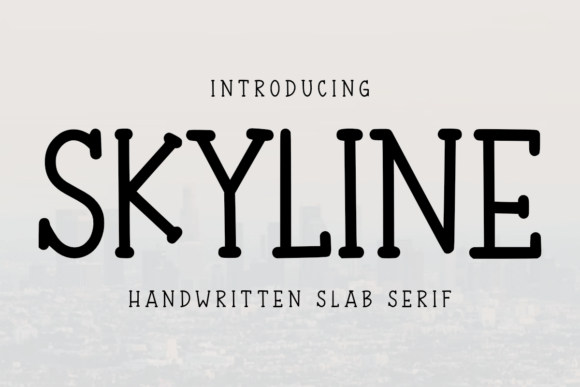
Skyline: A Handwritten Slab Serif Font for Creative and Productive Projects
Fonts are more than just letters on a page—they’re the silent voice that shapes how your message is received. Choosing the right typeface can enhance readability, evoke emotion, and even boost the perceived value of your work. Skyline, a natural slab serif handwritten font, offers a unique blend of charm, clarity, and versatility that makes it an excellent choice for both personal and professional applications.
What Makes Skyline Stand Out?
Skyline isn’t just another decorative font; it’s designed with purpose. Its organic feel mimics the fluidity of handwriting while maintaining the structured elegance of slab serifs. This balance allows it to stand out in design-heavy environments without sacrificing legibility. Whether you're crafting a planner, designing event invitations, or creating printables for sale on platforms like KDP (Kindle Direct Publishing), Skyline brings a touch of warmth and sophistication.
The font’s original design ensures it doesn’t look overused or generic, which is especially important when trying to maintain a unique brand identity. It’s ideal for users who want something creative yet functional—perfect for weekly planners, monthly calendars, worksheets, and more.
Common Mistakes When Choosing Skyline
One common mistake people make when selecting a font like Skyline is focusing too much on aesthetics and not enough on practicality. While its charming appearance might be tempting for every project, using it excessively in long-form text can reduce readability. For instance, if you're building a planner that includes large blocks of content like daily notes or task descriptions, relying solely on Skyline may lead to eye strain or confusion for users.
Another oversight is not considering the licensing terms before downloading or purchasing Skyline. Many fonts have restrictions on commercial use, especially in print-on-demand (POD) projects. If you plan to use Skyline in digital products sold through KDP or other POD services, ensure that the license explicitly covers such usage. Failing to verify this can result in legal issues down the line.
How to Use Skyline Effectively
To avoid these pitfalls, consider using Skyline as an accent rather than a primary font. Pair it with a clean sans-serif or a traditional serif font for body text. For example, in a planner template, you could use Skyline for headings and decorative elements while reserving a simpler font for the main content areas. This approach maintains visual appeal without compromising usability.
- Use in Headers: Skyline shines in titles, chapter headings, or section dividers where personality is key.
- Limit in Long Text: Avoid using it for paragraphs or extended reading passages to keep the user experience smooth.
- Test on Multiple Devices: Make sure Skyline looks good on both screen and print. Sometimes a font appears beautiful on one medium but less so on another.
Choosing the Right Version
Skyline typically comes in multiple weights and styles, which is great news for designers looking to add depth to their layouts. However, a frequent misunderstanding is assuming all versions are equally suited for every task. For instance, the bold variant might be too heavy for certain greeting cards, making the design feel cluttered. Conversely, the light version could lose its character in printed materials. Always review the available styles and test them in your intended context before finalizing a design.
Also, some versions of Skyline include special characters or ligatures that aren't immediately obvious. These features can elevate the font’s usefulness for crafts like Cricut or Silhouette projects. Before purchasing or downloading, check the font package details to see what extras come included. You might find additional tools that help streamline your creative workflow.
Why People Love Skyline
Many creators appreciate Skyline for its ability to blend creativity with professionalism. Educators love it for student-friendly worksheets and handouts, while entrepreneurs use it to craft visually appealing marketing materials. Bloggers often incorporate it into headers or call-to-action sections to draw attention without overwhelming readers.
Its adaptability also makes it a favorite among hobbyists and small business owners working on printables. The font adds a personal touch that mass-produced designs lack, helping products feel more authentic and inviting.
Missteps in Comparing Fonts
When evaluating Skyline against other fonts, some users fall into the trap of comparing it only to similar handwritten or slab serif fonts. They overlook the broader landscape of typography and miss opportunities to create contrast and hierarchy in their designs. A better approach is to compare it with a range of styles—serif, sans-serif, script—to determine how it complements each element in your layout.
For instance, pairing Skyline with a modern sans-serif like Montserrat can create a fresh, balanced aesthetic. Or using it alongside a minimalist serif like Lora can give your project a classic yet creative vibe. Understanding how Skyline interacts with different fonts helps you build more cohesive and professional-looking documents.
Practical Tips for Downloading and Using Skyline
Before downloading Skyline, always verify the source. Some free font sites offer knockoffs that may look similar but lack quality or proper licensing. Stick to reputable platforms like Creative Market, MyFonts, or Adobe Fonts to ensure you're getting the real thing and avoiding potential copyright problems.
Once you’ve downloaded Skyline, install it correctly on your device. On Windows, simply double-click the font file and click “Install.” On macOS, open the Font Book app and drag the font into the window. After installation, preview it in your preferred design software—whether that’s Canva, Photoshop, or Microsoft Word—to get a sense of how it behaves at different sizes and line heights.
Realistic Examples of Skyline in Action
Let’s say you’re designing a birthday card. Using Skyline for the greeting (“Happy Birthday!”) adds a warm, personalized touch. But if you follow it with a paragraph of text in the same font, the reader may struggle to stay engaged. Instead, switch to a simple font like Calibri or Helvetica for the body text, allowing Skyline to highlight the most important parts.
Or imagine you're creating a printable planner for your audience. If you apply Skyline to every heading, the overall design might feel inconsistent or chaotic. A better strategy is to reserve it for major sections like “Weekly Goals” or “Monthly Reflections,” while using a secondary font for smaller headings and bullet points.
Things to Check Before Finalizing Your Choice
- License Agreement: Confirm whether Skyline supports commercial use, especially if you plan to sell products online.
- Character Set: Ensure it includes the symbols and accents you need, particularly if your project involves multiple languages or special formatting.
- Design Compatibility: Test Skyline within your existing templates or color schemes to see if it harmonizes well with your branding.
- Technical Performance: Check how it renders across different platforms and devices. A font that looks great on your desktop might appear blurry on mobile screens.
Learning Curve and Time-Saving Tips
If you’re new to using custom fonts like Skyline, there's a slight learning curve involved. Understanding how to layer fonts effectively, adjust spacing, and maintain visual consistency can take time. However, many design tools now offer intuitive font pairing suggestions or preset templates that simplify the process.
To save time, consider saving frequently used combinations as presets in your design software. For example, you might pair Skyline with a specific shade of blue and a set line height for all your planner designs. This creates a consistent look while reducing repetitive adjustments.
Maximizing Value with Skyline
Investing in a high-quality font like Skyline can pay off in multiple ways. It elevates the presentation of your work, increases user satisfaction, and sets your products apart from the competition. But the benefits don’t stop at aesthetics. A well-chosen font can improve engagement and readability, leading to better outcomes whether you're sharing a journal or selling a product.
For marketers and bloggers, using Skyline strategically in headlines or pull quotes can help capture attention and guide the reader’s focus. In educational settings, teachers can use it to highlight key concepts or motivational messages in lesson plans and study guides.
Final Thoughts on Choosing Skyline
While Skyline is a powerful tool in any designer’s toolkit, it’s important to use it wisely. Don’t let its charm blind you to its limitations. Be mindful of where and how you apply it, and always double-check licensing and compatibility before committing to a project. With thoughtful use, Skyline can become a trusted part of your creative arsenal, adding personality and professionalism to everything from daily planners to event invitations.